
Select Your Immediate Task / नागरिक सेवा निवडा / સેવા પસંદ કરો
Direct statutory links to download certified extracts, inspect village records, compute parcel dimensions, and verify legal encumbrances:
Interactive 7/12 Extract Document Decoder
Select any column below to understand its legal meaning, statutory restrictions, and conveyance impact:
Class I (भोगवटादार वर्ग १ / જૂની શરત): Unrestricted tenure. The landholder possesses full alienation rights to sell, mortgage, gift, or bequeath the land without state permissions.
Class II (भोगवटादार वर्ग २): Conditional occupancy tenure granted under government land-allotment or tenancy-reform schemes under Section 29 of the Maharashtra Land Revenue Code, 1966. Transfer, sale, or non-agricultural use requires prior written sanction from the District Collector and payment of prescribed state premium (Najarana). Transfers attempted without required statutory permission are legally invalid under applicable revenue law.
Buyer's 7/12 Land Due Diligence Verification Scorecard
Before paying any token advance or executing an agreement to sell, verify each statutory condition on the 7/12 extract:
Statutory Validity of Digitally Signed Land Records
Under the Digital India Land Records Modernization Programme (DILRMP), state revenue departments have automated the issuance of Record of Rights certificates. The implementation of digital signatures transforms land administration by eliminating delays associated with physical verification at the local Talathi office. For broader background on Maharashtra records, see our Maharashtra 7/12 Portal Guide.
Legislative Foundation
- Section 63 of the Bharatiya Sakshya Adhiniyam, 2023 (formerly Section 65B, Indian Evidence Act, 1872): Admissibility of electronic records, subject to the certificate requirements in that section.
- Section 78 of the Bharatiya Sakshya Adhiniyam, 2023 (formerly Section 79, Indian Evidence Act, 1872): Presumption as to the genuineness of qualifying certified copies issued by authorised officers.
- Information Technology Act, 2000: Legal recognition of electronic signatures and secure digital tokens.
Step-by-Step Procedure to Check, Download, and Verify Land Records (Maharashtra)
The Maharashtra Land Records Department provides two distinct public services: free uncertified inspection on Mahabhulekh and digitally signed certified document downloads on DigitalSatbara. Follow the official procedural instructions below for each service:
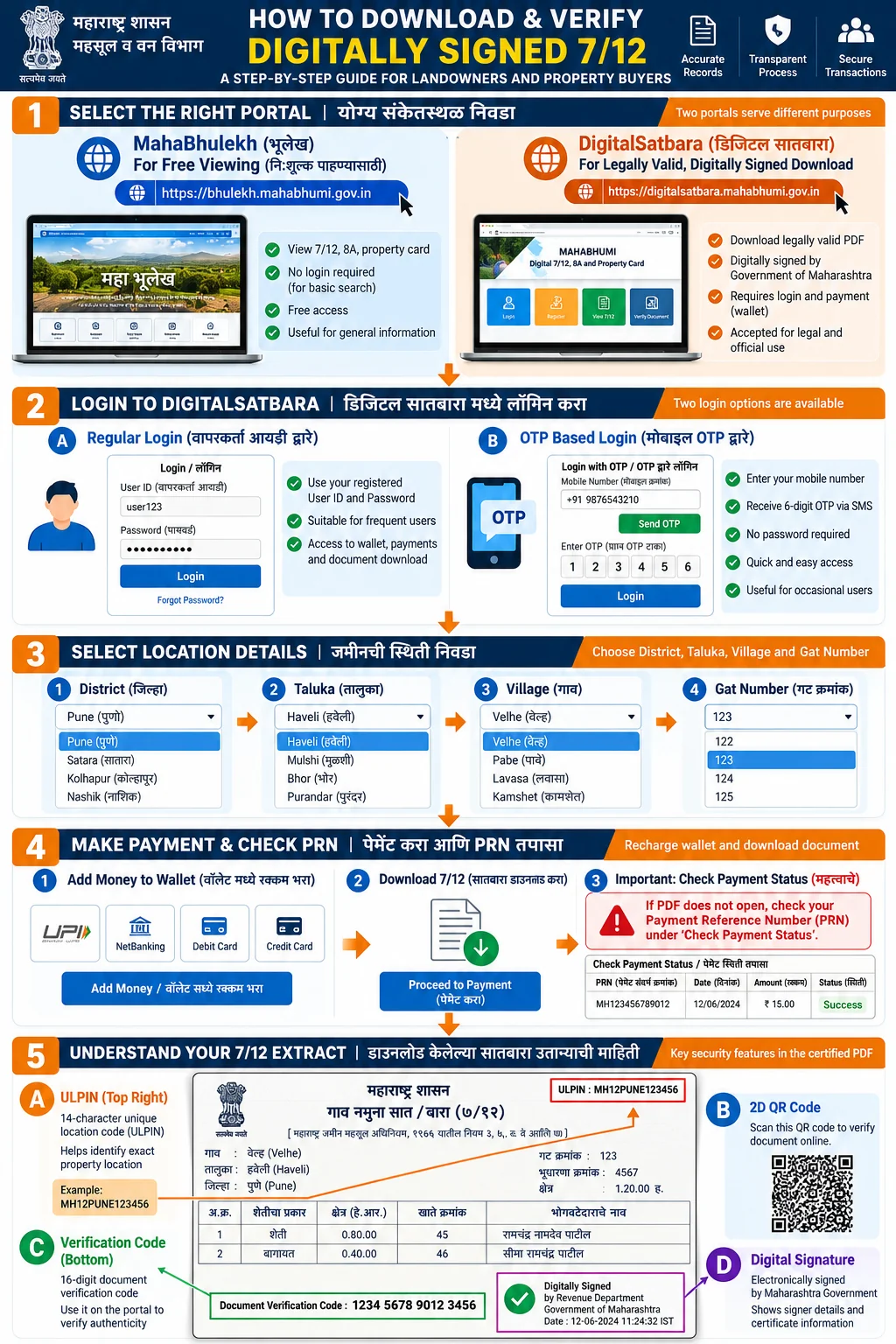
How to Access Digital 7/12 Extract (Official 5-Step Procedure)
- Visit the Portal: Open the official DigitalSatbara Official Portal for certified downloads, or access Mahabhulekh for free uncertified viewing.
- Login or Register: Access your account using Regular Login or choose OTP Based Login by entering your 10-digit mobile number for instant verification.
- Select Land Details: Choose your District (जिल्हा), Taluka (तालुका), and Village (गाव), then enter your Survey Number or Gat Number.
- Make Payment: Pay the statutory fee of Rs 15 per certified copy through the integrated payment gateway using UPI, Net Banking, or Debit Card.
- Download Verified PDF: Save the officially verified digital 7/12 extract PDF featuring a dynamic 2D QR code and 14-character ULPIN to your device.
A. Free Informational Viewing on Mahabhulekh (bhulekh.mahabhumi.gov.in)
- Open the official viewing portal: Mahabhulekh Official Viewing Portal.
- Select your administrative division from Maharashtra's six revenue divisions (Konkan, Pune, Nashik, Chhatrapati Sambhajinagar, Amravati, or Nagpur).
- Choose your jurisdictional District (जिल्हा), Taluka (तालुका), and Revenue Village (गाव) from the drop-down menus.
- Select your preferred search criterion: Survey Number, consolidated Gat Number, First Name, Middle Name, Last Name, or Complete Name.
- Enter your registered mobile number, solve the security captcha, and review the computerized 7/12 or 8A extract displayed on your screen.
- Operational Status: Mahabhulekh is a view-only service provided free of cost. It is intended for general citizen reference and informational awareness. It does not carry a digital signature or cryptographic certificate and is not admissible as a certified legal copy for court or bank transactions.
B. Downloading Digitally Signed Certified Records on DigitalSatbara (digitalsatbara.mahabhumi.gov.in)
- Access the official portal: DigitalSatbara Official Portal.
- Choose your login gateway: Regular Login (with username and password) or OTP Based Login (entering a 10-digit mobile number and authenticating with an instant SMS OTP).
- Important Wallet Notice: Regular Login and OTP Based Login maintain separate, independent digital wallets. Balances recharged under Regular Login cannot be accessed through OTP Based Login, and vice versa. Always check your active login mode before initiating a recharge.
- Verify your available wallet balance. If the balance is insufficient, select Recharge Account and choose a supported payment gateway (SBI ePay, Net Banking, Credit/Debit Card, or BHIM UPI).
- Payment Status Recovery: If funds are debited from your bank account but your portal wallet balance does not immediately update, do not attempt a duplicate payment. Navigate to the Check Payment Status tab, input your 18-digit Payment Reference Number (PRN), and click check status to reconcile your transaction.
- Select the required document service: Digitally Signed 7/12, Digitally Signed 8A, or Digitally Signed Ferfar (गाव नमुना ६). Note that extracts of 7/12, 8A, and Ferfar incur a statutory fee of Rs 15 per document, whereas City Survey Property Cards currently incur no portal charge according to the official help manual.
- Select your District, Taluka, Village, enter the Gat/Survey number, select the appropriate sub-division (Hissa Number), and click Download.
- The portal deducts the statutory fee from your active wallet and generates the certified PDF. Download and save the certified PDF extract immediately to your local device storage.
C. Document Verification Process via 16-Digit Verification Number
Maharashtra Government orders (including Revenue Department circular dated 6 December 2022) provide that every digitally signed land-record document carries a dynamic 2D QR code and a distinct 16-digit document verification number printed on the extract. To verify the authenticity of a downloaded document:
- Visit the DigitalSatbara Verification Window and select the Verify Document tab.
- Enter the 16-digit document verification number printed in the header or margin of your downloaded PDF document.
- Input the security captcha and click Submit. The portal displays the official verification details and allows downloading an authoritative verification copy directly from state land records servers.
- Technical Distinction: The 16-digit document verification number and QR code confirm the cryptographic validity of the specific issued PDF. This is distinct from the 14-character alphanumeric ULPIN (Bhu-Aadhaar), which serves as the nationwide geospatial identifier for the underlying land parcel boundaries.
Legal Status of Digitally Signed Land Records
Digitally signed land-record extracts issued through Maharashtra's official portal are intended for official and legal use. They include portal-provided verification information and do not require the traditional manual Talathi signature where the applicable government instructions recognize the digitally signed document. Check the receiving authority's requirements for your particular transaction.
While an official certified extract carries a legal presumption regarding the genuineness of the copy itself, a land-record entry by itself is not conclusive proof of ownership or legal title. Legal title must be established through registered conveyance deeds, succession records, and independent advocate search reports.
डिजिटल स्वाक्षरीत सातबारा डाउनलोड आणि पडताळणी कार्यपद्धती (मराठी)
महाराष्ट्र भूमी अभिलेख विभागामार्फत नागरिकांसाठी दोन स्वतंत्र सेवा उपलब्ध करून देण्यात आल्या आहेत. त्यांची सविस्तर कार्यपद्धती खालीलप्रमाणे आहे:
१. महाभूलेख मोफत सातबारा पाहणी (bhulekh.mahabhumi.gov.in)
- शासकीय महाभूलेख अधिकृत संकेतस्थळास भेट द्या.
- आपला महसूल विभाग (कोकण, पुणे, नाशिक, छत्रपती संभाजीनगर, अमरावती, किंवा नागपूर) निवडा.
- आपला जिल्हा, तालुका आणि गाव निवडून गट क्रमांक किंवा खातेदाराचे नाव टाका.
- सुरक्षा कॅप्चा टाकून संगणकीय सातबारा किंवा ८अ उतारा स्क्रीनवर पाहा. हा उतारा केवळ माहितीसाठी विनामूल्य उपलब्ध असून, यावर डिजिटल स्वाक्षरी नसते.
२. डिजिटल स्वाक्षरीत सातबारा डाऊनलोड पद्धत (digitalsatbara.mahabhumi.gov.in)
- अधिकृत डिजिटल सातबारा अधिकृत पोर्टलवर जा.
- 'Regular Login' किंवा 'OTP Based Login' निवडा. महत्त्वाची नोंद: Regular Login आणि OTP Based Login या दोन्ही लॉगिन पद्धतींचे वॉलेट स्वतंत्र असते. एका वॉलेटमधील शिल्लक दुसऱ्या पद्धतीत वापरता येत नाही.
- वॉलेट शिल्लक तपासा. सातबारा, ८अ आणि फेरफार उताऱ्यासाठी प्रत्येकी रु. १५ शासकीय शुल्क लागते (प्रॉपर्टी कार्डसाठी सध्या कोणतेही शुल्क आकारले जात नाही). UPI किंवा नेट बँकिंगद्वारे वॉलेट रिचार्ज करा.
- पैसे कापले पण वॉलेट अपडेट झाले नाही, तर पुन्हा पैसे न भरता 'Check Payment Status' पर्यायामध्ये जाऊन आपला PRN क्रमांक टाकून स्थिती तपासा.
- जिल्हा, तालुका, गाव निवडून गट क्रमांक टाका आणि प्रमाणित डिजिटल स्वाक्षरीत उतारा डाऊनलोड करा. पीडीएफ फाईल तत्काळ आपल्या डिव्हाइसवर सेव्ह करा.
३. १६ अंकी पडताळणी क्रमांकाद्वारे उताऱ्याची खातरजमा (Verification)
महाराष्ट्र शासनाच्या ६ डिसेंबर २०२२ च्या परिपत्रकानुसार प्रत्येक डिजिटल स्वाक्षरीत उताऱ्यावर एक २डी क्यूआर कोड आणि स्वतंत्र १६ अंकी पडताळणी क्रमांक छापलेला असतो. उताऱ्याची सत्यता तपासण्यासाठी:
- डिजिटल सातबारा पोर्टलवरील 'Verify Document' पर्यायावर जा.
- उताऱ्यावर छापलेला १६ अंकी पडताळणी क्रमांक प्रविष्ट करा.
- कॅप्चा टाकून सबमिट केल्यास शासकीय सर्व्हरवरील मूळ प्रत स्क्रीनवर दिसते आणि पडताळणी प्रत डाऊनलोड करता येते.
- लक्षात ठेवा: १६ अंकी पडताळणी क्रमांक दस्तऐवजाची सत्यता तपासण्यासाठी असतो, तर १४ अक्षरी ULPIN (भू-आधार) हा त्या शेतजमिनीच्या भूखंडाचा स्वतंत्र ओळख क्रमांक आहे.
कायदेशीर वैधता आणि मर्यादा
शासकीय निर्णयानुसार डिजिटल स्वाक्षरी असलेले सातबारा, ८अ आणि मालमत्ता पत्रक शासकीय व कायदेशीर कामांसाठी ग्राह्य धरले जातात; यावर तलाठ्याच्या हाताने सही किंवा शिक्का मारण्याची गरज नसते. तरीही, सातबारा उतारा हा महसुली दस्तऐवज असून तो मालकी हक्काचा अंतिम पुरावा नाही.
ડિજિટલી સાઇન કરેલ સાતબારા ડાઉનલોડ કરવાની પદ્ધતિ (ગુજરાતી)
મહારાષ્ટ્ર સરકારના મહેસૂલ વિભાગ દ્વારા ડિજિટલ સાતબારા પોર્ટલ પરથી કાનૂની માન્યતા ધરાવતો ૭/૧૨ ઉતારો ડાઉનલોડ કરવા માટેના મુખ્ય ૫ પગલાં નીચે મુજબ છે:
- સત્તાવાર પોર્ટલની મુલાકાત: સત્તાવાર ડિજિટલ સાતબારા પોર્ટલ પર જાઓ.
- લોગિન અથવા ઓટીપી રજિસ્ટ્રેશન: રેગ્યુલર યુઝર આઈડી અથવા તમારા ૧૦-અંકના મોબાઈલ નંબર પર ઓટીપી મેળવીને લોગિન કરો.
- જમીનની વિગતો પસંદ કરો: જિલ્લો, તાલુકો અને ગામ પસંદ કરો. ત્યારબાદ સર્વે નંબર અથવા ગટ નંબર દાખલ કરો.
- સરકારી ફીની ચૂકવણી: પ્રતિ ઉતારા ૧૫ રૂપિયાની સત્તાવાર ફી યુપીઆઈ (UPI), નેટ બેંકિંગ અથવા ડેબિટ કાર્ડ દ્વારા ચૂકવો.
- પ્રમાણિત પીડીએફ ડાઉનલોડ કરો: ક્યુઆર કોડ અને ૧૬-અંકના વેરિફિકેશન કોડ સાથેની પીડીએફ ફાઇલ ડાઉનલોડ કરો. આ નકલ માટે તલાઠીના સહી કે સિક્કાની જરૂર નથી.
કાનૂની સલાહ
ડિજિટલી સાઇન કરેલ ૭/૧૨, ૮-અ અને ફેરફાર નોંધો બેંક લોન અને કોર્ટ કાર્યવાહી માટે સત્તાવાર રીતે સ્વીકાર્ય છે, પરંતુ તે માલિકી હક્ક સ્થાપિત કરતો નથી. માલિકી માટે રજિસ્ટર્ડ દસ્તાવેજ ચકાસવો જરૂરી છે.
Frequently Asked Questions
Does a digitally signed 7/12 require an ink signature or stamp from the Talathi?
No. A DigitalSatbara extract carries the Revenue Officer's digital signature and a QR code, and Maharashtra Revenue Department orders state that it needs no Talathi ink signature or stamp. Before relying on the order number cited on this site (Jamin-2018/P.K.126/J-1) in a dispute, confirm it against the GR archive at maharashtra.gov.in. Section 78 of the Bharatiya Sakshya Adhiniyam, 2023 governs the presumption for qualifying certified copies.
डिजिटल स्वाक्षरीत सातबाऱ्यावर तलाठ्याच्या सहीची गरज असते का?
नाही. महाराष्ट्र शासनाच्या शासन निर्णय (GR) क्र. जमीन-२०१८/प्र.क्र.१२६/ज-१ नुसार संगणकीकृत डिजिटल स्वाक्षरी असलेला सातबारा हा कायदेशीररित्या प्रमाणित प्रत मानला जातो. यावर महसूल अधिकाऱ्याची डिजिटल स्वाक्षरी, १६ अंकी पडताळणी क्रमांक आणि तपासणीसाठी QR कोड असतो. कोणताही शासकीय विभाग किंवा बँक तलाठ्याच्या प्रत्यक्ष सही किंवा शिक्क्याचा आग्रह धरू शकत नाही.
How do I verify the authenticity of a downloaded digitally signed 7/12 extract?
Digitally signed extracts issued through the portal feature a dynamic 2D QR code and a 16-digit document verification number. Where assigned, a 14-character ULPIN (Bhu-Aadhaar) identifier is also recorded. Scan the QR code or visit the official 'Verify 7/12' (७/१२ पडताळणी) option on the DigitalSatbara portal (digitalsatbara.mahabhumi.gov.in/dslr) to confirm document genuineness.
Can a bank reject a digitally signed 7/12 extract and demand a physical stamp from the Talathi?
Maharashtra Revenue Department orders direct that digitally signed extracts be accepted without a physical stamp, but each bank sets its own documentation policy. If a branch refuses, ask for the refusal in writing and escalate to the bank's grievance officer, citing the Revenue Department order. Section 78 of the Bharatiya Sakshya Adhiniyam, 2023 presumes a qualifying certified copy to be genuine; that presumption covers authenticity of the copy, not the correctness of title.
डिजिटल सातबारा डाऊनलोड करताना पैसे कापले पण पीडीएफ आली नाही तर काय करावे?
जर डिजिटल सातबारा पोर्टलवर पेमेंट यशस्वी झाले परंतु नेटवर्क त्रुटीमुळे पीडीएफ डाऊनलोड झाली नाही, तर पुन्हा पैसे भरू नका. पोर्टलवरील 'Payment History' टॅबवर जाऊन आपल्या GRAS ट्रान्झॅक्शन आयडी समोरील 'Check Status' बटनावर क्लिक करा. शासकीय बँक प्रणाली ४५ मिनिटांच्या आत खात्री करून पीडीएफ अनलॉक करते, जिथून तुम्ही विनाशुल्क उतारा डाऊनलोड करू शकता.
How long is a downloaded digitally signed 7/12 extract legally valid?
Under statutory revenue rules, a digitally signed 7/12 extract has no fixed expiry date for proving historical ownership. However, for active transactions such as registering a sale deed, creating a bank mortgage, or submitting an agricultural loan application, lending institutions and sub-registrars typically require an extract issued within the preceding 30 days to ensure no subsequent encumbrances or mutation entries have been posted.
What is the difference between digitally signed 7/12 and 8A extracts?
The 7/12 extract is parcel-specific, documenting the soil classification, survey boundaries, tenant occupants, crops, and encumbrances of a single Survey/Gat Number. Village Form 8A is an individual Khatedar account ledger, compiling all separate land parcels owned by a specific farmer within that village and calculating the total land assessment payable.
What statutory resolution establishes that digitally signed 7/12 extracts cannot be rejected by banks or courts?
Under the Maharashtra Revenue Department Government Resolution dated 4 December 2025 read with Section 4 of the Information Technology Act, 2000 and Section 78 of the Bharatiya Sakshya Adhiniyam, 2023, digitally signed 7/12, 8A, and e-Ferfar extracDigitally signed records issued through Maharashtra's official portal are intended for official and legal use. Follow the current government verification procedure. Confirm any additional requirements with the authority receiving the document.
How does dynamic QR code verification work on a downloaded digital extract?
Each digitally signed 7/12 extract generated by the DigitalSatbara portal features a cryptographic 2D QR code at the top right margin. Scanning this QR code using a smartphone camera or handheld QR scanner resolves to the official Mahabhumi verification URL, retrieving the server-certified metadata including the exact timestamp of download, cryptographic hash, and current mutation status directly from the state data center.
What is the statutory fee structure for downloading digital revenue extracts on Aaple Sarkar DSLR?
The Maharashtra Land Records Department FAQ lists Rs 15 per copy for digitally signed copies of Village Form VII-XII, Village Form 8A (Khata extract), or Village Form 6 (Ferfar mutation entry). Fees depend on the document and service selected; verify the active portal amount before payment. Citizens recharge an integrated pre-paid wallet through Net Banking, UPI, or Debit Card.
What should a citizen do if a transaction fails after wallet deduction without PDF delivery?
If payment is debited but the digital PDF is not generated immediately, do not initiate an immediate duplicate payment. Navigate to the 'Check Payment Status' facility on the official DigitalSatbara portal (digitalsatbara.mahabhumi.gov.in) and enter your Payment Reference Number (PRN). Once the payment gateway confirms the transaction status as Success, the document is reconciled and available in your account download history.
How can a user verify the DSC digital certificate validity in Adobe Acrobat Reader?
When opening a digitally signed 7/12 PDF in Adobe Acrobat, the digital signature banner may show 'Signature validity is unknown' until state root certificates are trusted. Click on 'Signature Properties', select 'Show Signer's Certificate', navigate to the 'Trust' tab, and click 'Add to Trusted Certificates'. Check 'Use this certificate as a trusted root' and 'Certified documents'. The ribbon will turn green with a checkmark confirming 'Signed and all signatures are valid'.
Can digitally signed 7/12 extracts be generated for historical or legacy dates?
No. The DigitalSatbara DSLR portal generates real-time, current snapshots reflecting the active revenue ledger at the precise second of extraction. For historical ownership records prior to digital migration (pre-computerization records from 1950 to 2010), citizens must apply through the Aapli Chawadi e-Records portal or submit an application to the Taluka Tehsil Record Room (Abhilekh Kaksh) for certified archival copies.
What is the difference between an unsigned Mahabhulekh extract and a digitally signed DSLR extract?
An unsigned extract viewed on Mahabhulekh (bhulekh.mahabhumi.gov.in) is explicitly watermarked 'फक्त माहितीसाठी' (For Information Only) and carries no legal admissibility. A digitally signed extract from DigitalSatbara (digitalsatbara.mahabhumi.gov.in/dslr) contains an official cryptographic digital signature, dynamic QR code, and a 16-digit verification number. Section 78 of the Bharatiya Sakshya Adhiniyam, 2023 provides for a presumption of genuineness for qualifying certified copies, subject to statutory conditions. Revenue entries do not conclusively determine substantive title.
Is an Aadhaar e-KYC mandatory before creating a citizen account on DigitalSatbara?
Citizens can register on the Aaple Sarkar portal using either standard mobile OTP registration or Aadhaar-based e-KYC. While basic mobile OTP allows downloading standard extracts, linking Aadhaar e-KYC enables automated property portfolio binding, where all land parcels registered under the citizen's Aadhaar are aggregated under a unified dashboard.
How can citizens log in to DigitalSatbara (7 12 Login) without a complex password?
Citizens can log in to DigitalSatbara (digitalsatbara.mahabhumi.gov.in) without an alphanumeric password by choosing the 'OTP Based Login' option on the portal homepage. Enter your active 10-digit Indian mobile number and request a One Time Password (OTP). Upon entering the verified 6-digit OTP received via SMS, access to the document download dashboard is granted immediately. Regular Login is a separate access mode requiring a registered Login ID and password, and its prepaid wallet balance cannot be transferred to OTP Based Login.
Can citizens download digitally signed 8A Khata and e-Ferfar mutation extracts from the same portal?
Yes. The Maharashtra DigitalSatbara portal provides digitally signed versions of Village Form 7/12, Village Form 8A (Khata extract), Village Form 6 (e-Ferfar mutation extract), and City Survey Property Cards. The current Maharashtra Land Records Department FAQ lists Rs 15 per copy for digitally signed 7/12, 8A, and Ferfar extracts. Check the live portal display before making payment.
घरबसल्या मोबाईलवरून डिजिटल ७/१२ कसा डाऊनलोड करावा?
घरबसल्या मोबाईलवरून अधिकृत सातबारा काढण्यासाठी स्मार्टफोनमधील गुगल क्रोम ब्राऊझर उघडा आणि digitalsatbara.mahabhumi.gov.in वर जा. 'OTP Based Login' (ओटीपी आधारित लॉगिन) वर क्लिक करून मोबाईल नंबर आणि प्राप्त झालेला OTP टाकून लॉगिन करा. 'Recharge Account' मधून यूपीआय (Google Pay, PhonePe, Paytm) द्वारे विहित शुल्क भरा. त्यानंतर जिल्हा, तालुका, गाव निवडून गट क्रमांक टाका आणि डिजिटल स्वाक्षरी असलेला अधिकृत सातबारा डाऊनलोड करा.