
How to Search 7/12 Extract by Landholder Name Online
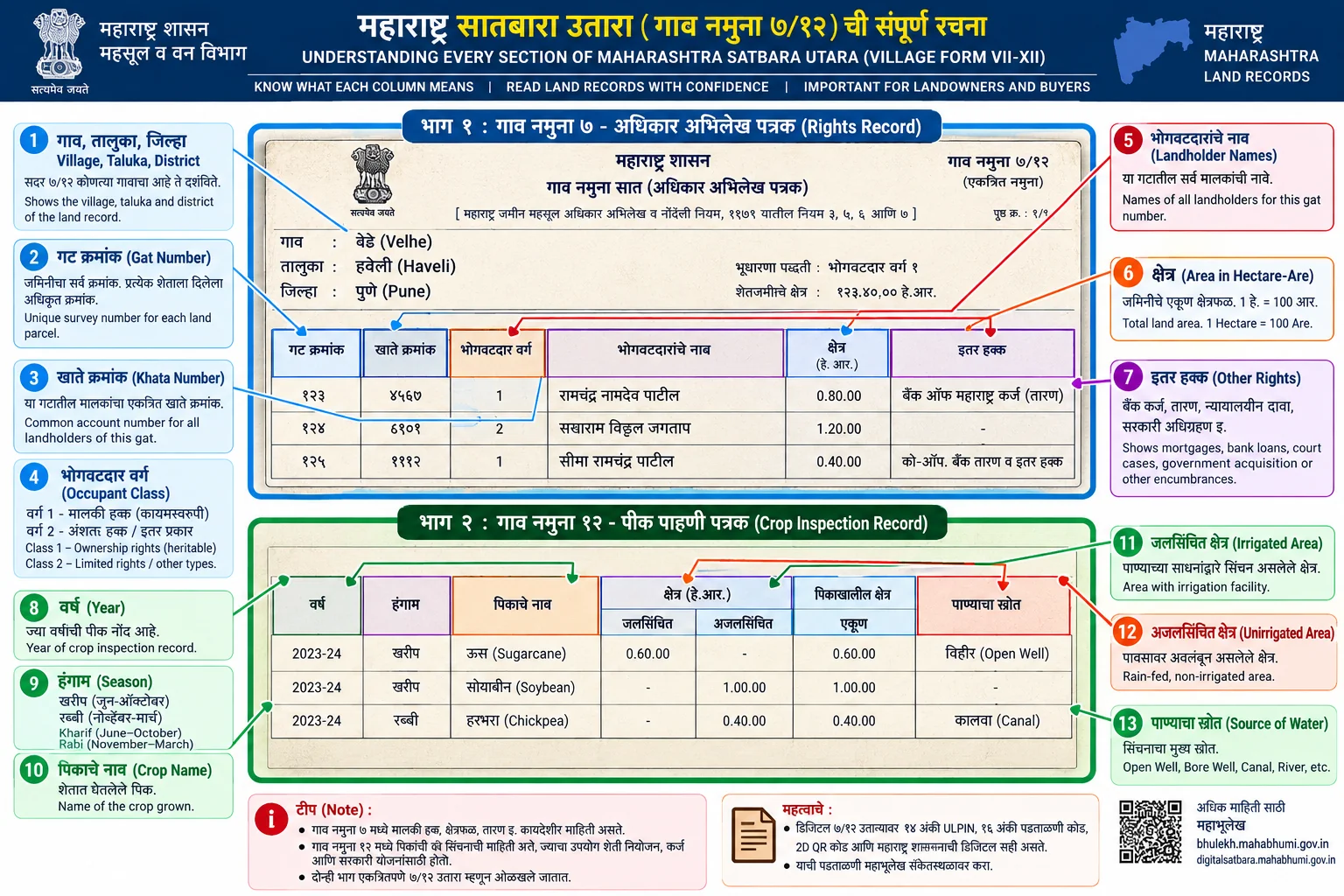
Citizens can search 7/12 land records by landholder name without knowing the Gat or Survey Number. On Maharashtra Mahabhulekh (bhulekh.mahabhumi.gov.in), select अक्षरी नाव शोध (Alphabetical Name Search) after choosing the district, taluka, and village. On Gujarat AnyRoR (anyror.gujarat.gov.in), choose Know Khata By Owner Name (ખાતેદારના નામ પરથી ખાતું જાણવા). Enter the registered Devanagari or Gujarati name. Revenue extracts serve fiscal administration and do not conclusively prove title.
Administrative Dimension Fact Sheet
| Administrative Dimension | Statutory Specification & Governance |
|---|---|
| State Portals | Maharashtra Mahabhulekh (bhulekh.mahabhumi.gov.in) | Gujarat AnyRoR (anyror.gujarat.gov.in) |
| Search Mode | First Name, Middle/Father Name, or Complete Surname in regional script |
| Required Script | Devanagari (Marathi) for Maharashtra | Gujarati script for AnyRoR |
| Alternative Identifier | Khata Number (खाते नंबर) or Aadhaar linkage where notified |
| Evidentiary Status | Reference extract only; title requires registered conveyance deed verification |
| Departmental Support | Talathi / Village Accountant Office or E-Dhara Kendra |
1. Overview of Name-Based Revenue Record Search
Locating agricultural land records without a registered Survey Number or Gat Number is a common requirement during inheritance settlements, boundary disputes, and property due diligence. Both Maharashtra and Gujarat provide digital name-search facilities on their official land revenue portals.
Under Section 148 of the Maharashtra Land Revenue Code, 1966, the Record of Rights maintains the names of all persons who are holders, occupants, owners, or mortgagees. Because spelling variations frequently occur in government records, understanding how the search engines index Devanagari and Gujarati phonetics is essential.
2. Step-by-Step Search on Maharashtra Mahabhulekh
To find a Satbara extract by landowner name in Maharashtra, follow this official sequence on Mahabhulekh:
- Open Official Portal: Access
bhulekh.mahabhumi.gov.inand select your administrative Revenue Division (Amravati, Aurangabad, Konkan, Nagpur, Nashik, or Pune). - Select Jurisdiction: Choose the District (जिल्हा), Taluka (तालुका), and Revenue Village (गाव) from the dropdown menus.
- Choose Search Filter: Click on अक्षरी नाव (Name Search) or संपूर्ण नाव (Full Name Search).
- Enter Landholder Name: Enter the first name, father/husband name, or surname in Marathi Devanagari script using an in-browser keyboard or Google Input Tools. Entering a minimum of 3 characters displays a matching Khatedar list.
- Select Account: Select the correct individual Khatedar from the populated list to view the corresponding 7/12 extract.
3. Step-by-Step Search on Gujarat AnyRoR Portal
Gujarat Revenue Department administers name searches under the E-Dhara system through AnyRoR:
- Access AnyRoR: Visit
anyror.gujarat.gov.inand navigate to View Land Record Rural or Urban. - Select Service Type: Select the dropdown option Know Khata By Owner Name (ખાતેદારના નામ પરથી ખાતું જાણવા).
- Input Administrative Hierarchy: Select District (જિલ્લો), Taluka (તાલુકો), and Village (ગામ).
- Input Name in Gujarati: Type the Khatedar name in Gujarati script. The system generates a dropdown matching recorded landholder accounts.
- Resolve Khata to 7/12: Once the system retrieves the Khata Number, use that number under VF-7 By Khata Number to display the full Village Form 7 extract.
4. Common Name Search Errors and Solutions
Phonetic Spelling Discrepancies
Historical revenue records entered by Talathis often use local dialect spellings. If your exact surname does not populate, search using only the first three letters of the first name, or search using the father's name alone.
Joint Family Holdings (Sam सामायिक क्षेत्र)
When ancestral land is recorded jointly, the primary account may be registered under the eldest family member or karta. If an individual co-sharer does not appear, check the primary Khatedar name recorded in the Form 8A Khata ledger.
Frequently Asked Questions
Can citizens search 7/12 extracts using English letters?
No. The official Mahabhulekh and AnyRoR databases query landholder entries in regional languages (Marathi Devanagari and Gujarati). Use a regional phonetic keyboard to input the name.
What should I do if my name is missing from the 7/12 search list?
If your name does not populate, verify whether a mutation entry (Ferfar) has been certified under Section 150 MLRC. You can also search by Khata Number or visit the Talathi office with your registered sale deed.
Is an unsigned 7/12 extract found by name search legally valid in court?
An unsigned extract viewed on Mahabhulekh is watermarked for informational reference only. For judicial proceedings, bank loans, or registered deeds, obtain a digitally signed certified copy through DigitalSatbara.
How can I find the Gat Number if I only know the owner name?
Search the owner name on Mahabhulekh. When the search retrieves the landholder account, the displayed 7/12 extract will list all Gat Numbers and Survey Numbers registered under that Khata.