
DigitalSatbara & Mahabhulekh Portal Troubleshooting: Practical Citizen Solutions
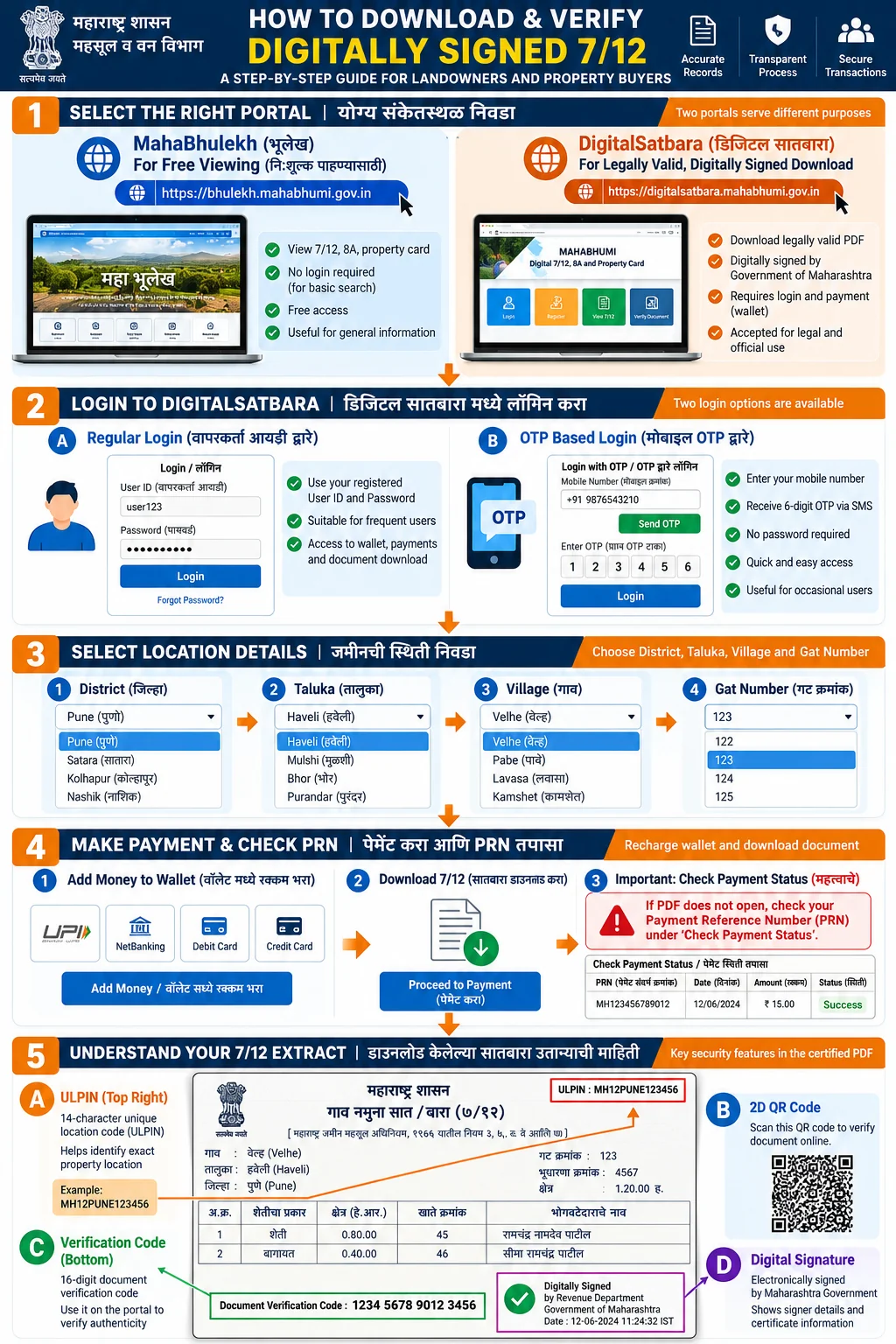
If payment is debited on DigitalSatbara (digitalsatbara.mahabhumi.gov.in) but the digitally signed 7/12 PDF does not generate immediately, do not pay again. Use the Check Payment Status facility on the portal header and submit your Payment Reference Number (PRN). For separate wallet balances, confirm whether you recharged under Regular Login or OTP Based Login. Revenue extracts serve fiscal administration and do not conclusively prove title.
Administrative Dimension Fact Sheet
| Administrative Dimension | Statutory Specification & Governance |
|---|---|
| Portal System | DigitalSatbara (digitalsatbara.mahabhumi.gov.in) & Mahabhulekh (bhulekh.mahabhumi.gov.in) |
| Payment Reconciliation Tool | Check Payment Status (पेमेंट स्टेटस तपासा) via Payment Reference Number (PRN) |
| Wallet Segregation | Regular Login (Username/Password) and OTP Based Login maintain isolated prepaid balances |
| Payment Gateway | Maharashtra Government Receipt Accounting System (GRAS) / State Treasury |
| PDF Digital Signature Standard | DSC token verified via Adobe Acrobat Reader root CCA certificate installation |
| Department Contact Desk | MahaBhumi Support Desk: 020-26050006 / 020-25712712 | dlrmah.mah@nic.in |
1. Payment Debited but 7/12 PDF Not Generated
A frequent problem experienced by citizens on DigitalSatbara is having money debited from a bank account, UPI app (PhonePe, Google Pay, Paytm), or digital wallet while the portal fails to download the certified PDF.
Do not initiate a duplicate payment. When transaction latency occurs between the bank gateway and the state treasury server, the portal stores the transaction under a pending reconciliation status. Follow this procedure:
- Locate Your PRN: Find your Payment Reference Number (PRN) or Bank Transaction Reference ID from your SMS or UPI payment receipt.
- Open Payment Status Tool: On the DigitalSatbara portal header, click on Check Payment Status (पेमेंट स्टेटस तपासा).
- Enter PRN: Enter the PRN and captcha code, then click Submit.
- Reconciliation Execution: The system queries the GRAS treasury gateway. If the bank transfer was successful, the status changes to Success and the extract is placed in your Download History.
2. Wallet Recharge Missing: Regular Login vs OTP Login
DigitalSatbara operates two independent, non-communicating user authentication gateways:
- Regular Login: Requires a registered Login ID and password, designed for frequent users, legal practitioners, and CSC centers.
- OTP Based Login: Requires only an active 10-digit mobile number and one-time SMS verification.
Important Distinction: Each gateway maintains an isolated prepaid balance. If you recharge Rs 100 while logged in via Regular Login, that balance cannot be viewed or utilized when logging in via OTP Based Login. Always log in through the exact same method you used to recharge your wallet.
3. Resolving Adobe Acrobat Signature Question Mark (?)
When opening a digitally signed 7/12 PDF in Adobe Acrobat Reader, the digital signature may display as an unverified yellow question mark (?) or show "Signature validity is unknown". This is a local PDF reader configuration issue, not a flaw in the document.
- Open the PDF in Adobe Acrobat Reader on a computer.
- Right-click on the signature panel and select Signature Properties.
- Click Show Signer's Certificate.
- Select the Trust tab and click Add to Trusted Certificates.
- Check the box for Certified documents and click OK.
- Click Validate Signature. The question mark converts into an official green checkmark.
4. Mahabhulekh Server Down or Captcha Failure Solutions
Mahabhulekh experiences high peak traffic during agricultural subsidy cycles. If pages fail to load or captcha codes fail to refresh:
- Open a private browsing window (Incognito Mode) to bypass outdated cached session cookies.
- Access the portal during off-peak hours (before 9:00 AM or after 8:00 PM).
- Verify whether your division link is accessible directly through regional mirror sub-nodes.
Frequently Asked Questions
How long does it take for a failed DigitalSatbara payment to refund?
If a payment status cannot be reconciled as successful, the debited funds are reversed by your bank within 3 to 7 working days as per Reserve Bank of India (RBI) e-commerce regulations.
Can I transfer money from my Regular Login wallet to my OTP Login wallet?
No. DigitalSatbara does not provide an inter-wallet balance transfer mechanism. Funds must be utilized within the gateway where they were recharged.
Why does Mahabhulekh captcha say 'Invalid Code' even when entered correctly?
This occurs when session cookies expire due to server latency. Refresh the captcha image or clear your browser cache before submitting.
Who should I contact if my payment is debited but PRN status shows failed?
Send an email with your PRN, bank transaction ID, date, and registered mobile number to the official department helpdesk at dlrmah.mah@nic.in or call 020-26050006 / 020-25712712.